
1. What gets installed where
An X30 patrol system is four computers and a handheld. The robot carries three: the motion host walks the robot and is never changed; the navigation host on the robot’s back runs the stack that drives it; the perception host inside the body runs the inspection cameras and records them. The operator’s Mac or laptop runs NETRA, the command center, and the Skydroid H12 runs the X30Controller app. Everything meets on the robot’s own network: its Wi-Fi, or a cable to the Debug Ethernet port at the tail.
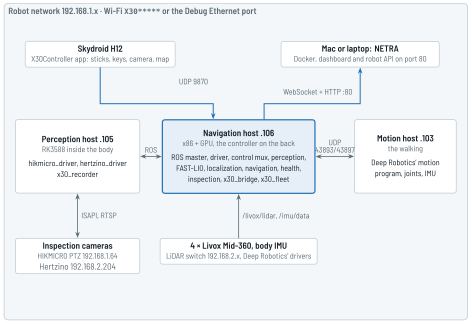
| Computer | Address | What you install |
|---|---|---|
| Navigation host | 192.168.1.106 | x30_ros (the whole workspace), the service x30-navigation; Deep Robotics’ own autonomy turned off |
| Perception host | 192.168.1.105 | x30_ros (the camera drivers and the recorder only), the service x30-perception |
| Motion host | 192.168.1.103 | nothing: one line in its network.toml |
| Mac or laptop | the robot’s network | NETRA (Docker), the tools to pack the sources and to install the app |
| Skydroid H12 | the robot’s Wi-Fi | the X30Controller app (APK) |
1.1 The versions this guide installs
| Part | Version | Where it comes from |
|---|---|---|
| x30_ros | 0.19 | https://github.com/DarmawanRobotics/x30_ros |
| X30Controller | 1.0 | https://github.com/DarmawanRobotics/X30Controller/releases |
| NETRA | with the substation module | https://github.com/DarmawanWeb/Netra (private) |
| Robot | Jueying X30 Pro | Deep Robotics; Ubuntu 20.04 and ROS Noetic on both hosts |
1.2 The way through this guide
The robot has no internet. Everything that downloads is done first, on the Mac, while it is online; then the Mac joins the robot’s Wi-Fi and carries it over.
Before you start (Chapter 2): the parts, the addresses and the passwords.
On the Mac, online (Chapter 3): pack the robot’s sources, download the app, build NETRA and register the robot.
On the robot (Chapter 4): copy, build, turn Deep Robotics’ autonomy off, introduce the hosts to each other.
The services (Chapter 5): the stack starts at boot under a watchdog; its settings.
A new robot (Chapter 8): the checks before it walks on its own, the first site and route.
Safety
The robot walks among energized equipment. Do the first bring-up in an open area, away from live parts, with one person at the handheld whose only job is to stop the robot. Keep the robot’s hard emergency stop (at the tail) and the handheld’s STOP within reach at every step.