
7. Inspection
At every stop point of a patrol the robot inspects the inspection points taught for that stop: it points the thermal camera at each piece of equipment, measures it and judges it, and listens with the acoustic camera where partial discharge is checked.
7.1 Teach the inspection points in NETRA
Substation › Inspection points › New point:
Pick the route and its Stop, and the type: Thermal or Partial discharge.
Set the camera’s pose: Pan °, tilt and zoom, as the camera saw the equipment at that stop.
For a thermal point, add a Target for each component (phase R, S, T, a clamp) and draw its region on the image; give Max °C, its rated temperature: a reading at or above it is critical (P1).
Create point.
The robot takes the plan with every patrol started from NETRA. A point Not on a route is Taken on request: NETRA asks the robot to inspect it where it stands (not during a patrol).
Note
The technician can also teach targets on the robot itself, from the camera’s current view (Tuning Guide, “Inspection”). Both work side by side; NETRA’s points are uploaded to NETRA.
7.2 What happens at a stop
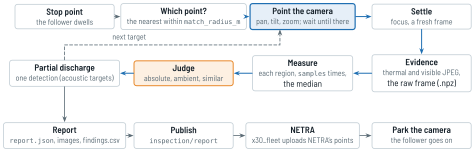
A stop with no inspection point just waits its time. A camera that does not answer is reported, never a reason to end the patrol.
7.3 How a finding is judged
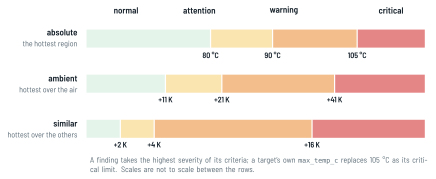
Every thermal target is judged three ways; the finding takes the highest severity of the three:
| Criterion | Compares |
|---|---|
| absolute | the hottest region with fixed limits, or the target’s rated temperature |
| ambient | the hottest region with the air temperature of the day |
| similar | the hottest region with the others of the same target (the three phases) |
Set the air temperature
The ambient criterion needs the day’s air temperature. The robot uses 30 °C until the technician sets it; on a hot day, loaded equipment otherwise reads high.
Partial discharge is classified by the acoustic camera:
| Type | Severity | Meaning |
|---|---|---|
| noise | normal | no discharge |
| corona | attention | common outdoors on high-voltage parts: watch the trend |
| surface | warning | tracking on insulators or terminations |
| floating | critical | a loose, floating part |
7.4 Where the results are
NETRA: Substation › Overview (every piece of equipment and its last capture), Findings (what needs action), each point with its trend of readings and its images (thermal, visible, sound map).
The H12: the last point and its severity after Inspect or a stop.
The robot: every report with its images and raw thermal frames, by day (
~/x30/reports); the oldest days go when the disk runs short.
Inspect on the H12 inspects the point where the robot stands, now: useful to check a newly taught point. It takes a few minutes for a point with several targets.